Open by choice

A building system doesn’t have to be single-brand. With an open controller you choose the best component for each job, or keep the one already installed. Here is how Siemens, Sonoff and other manufacturers’ devices work together.
When you design a system around a closed platform, the component choice is already made: sensors, controllers and actuators come from the brand’s catalogue. With an open controller and Home Assistant, you can choose: the Siemens controller already on the office wall, an affordable Zigbee thermostat or sensor for the bedroom, the actuator the installer knows best.
This article is about making different brands work together in one control system, with particular attention to wireless devices. In an earlier article we covered the three protocols, Modbus, KNX and Zigbee. Here we talk about actual, named devices, and how a Zigbee thermostat works with Home Assistant alongside professional equipment.
The reasons are practical, and they come up on almost every project we see.
For the plant room, the choice is almost always professional components proven over decades of use in commercial buildings.
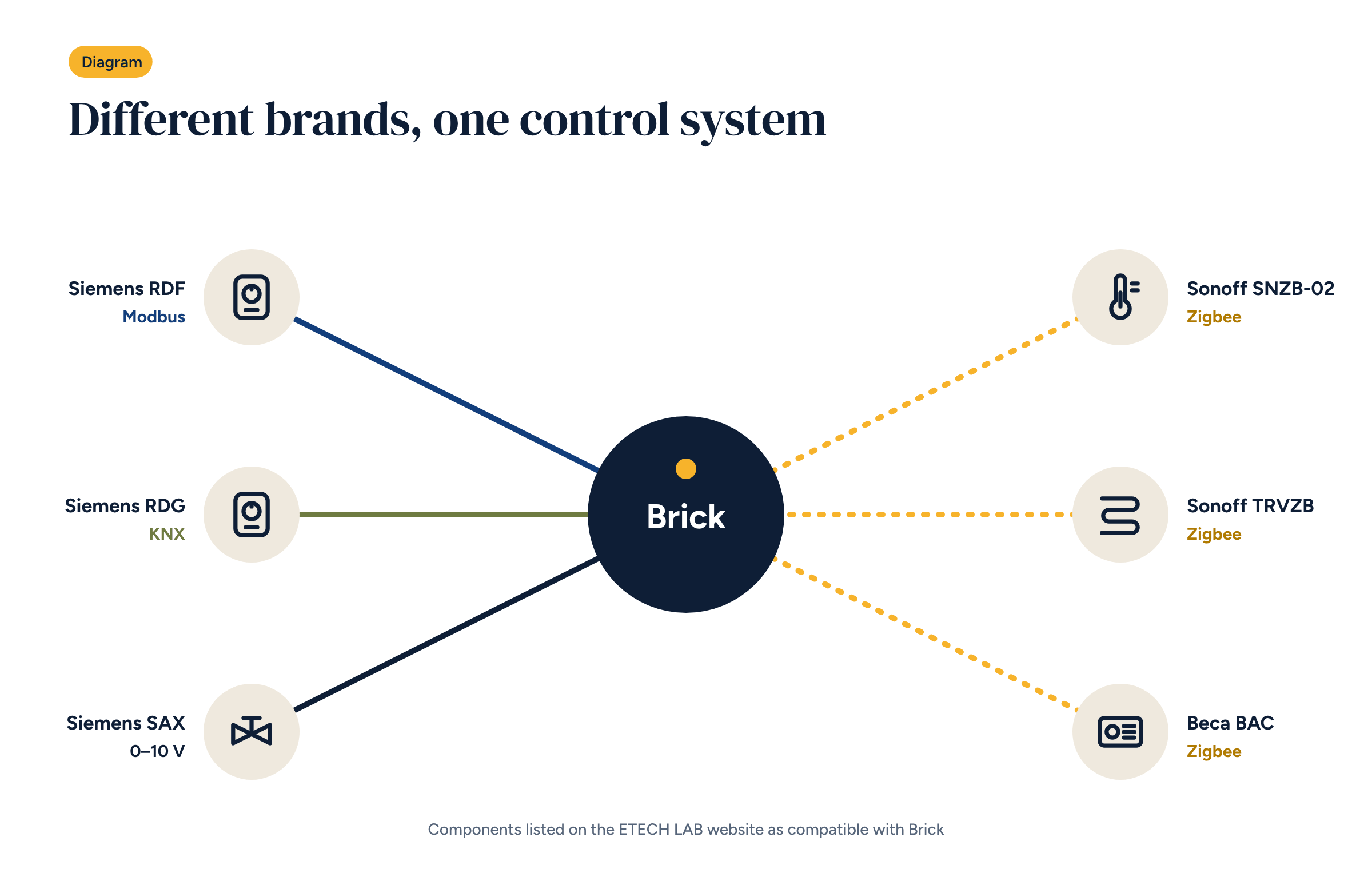
Actuators and valves. Siemens SAX, SAS and SSB modulating 0–10 V actuators drive the three-way valves: Siemens VXG mixing valves for the underfloor circuit, VXP45 for terminal units. The 0–10 V signal is a standard: any controller with an analogue output can drive it, as we saw in the article on three-way valves.
Room controllers. In more structured systems, offices and hotels, professional wall controllers are used. Siemens RDF communicate over Modbus, Siemens RDG over KNX. Brick reads and drives them like any other device on the bus.
In the rooms, especially in upgrades where nobody wants new cables in finished walls, Zigbee devices are often the best choice.
Temperature and humidity sensors. Sonoff SNZB-02 and SNZB-02P measure temperature and humidity and run on batteries for a long time. They are the basis of the B configurations, and essential wherever cooling is used, to calculate the dew point.
Radiator heads. For radiator systems, the Sonoff TRVZB replaces the traditional thermostatic head and is controlled by the controller, room by room.
Fan coil controllers. Beca BAC controllers manage a fan coil’s speeds and valve and communicate over Zigbee. They are used in configuration B5, described in the article on fan coils.
Wall thermostats. For people who want a physical control in the room, Zigbee thermostats such as the Bitron 902010/32 let you change the temperature from the wall as well as from the app.
To Home Assistant a device is a set of entities: a temperature, a humidity, a set point, a switch. Once integrated, the brand no longer matters: the Sonoff sensor and the Siemens controller both become sensor.temperature_... and are used the same way in Node-RED flows and dashboards.
For Zigbee, Home Assistant offers two popular routes: the native ZHA integration and the open-source Zigbee2MQTT project. Both work locally, without going through manufacturers’ cloud services. That matters: a Zigbee device that can only be used through its brand’s app and cloud brings back into the system the dependency you were trying to avoid.
Before choosing a device for a building system, check five things.
An office on two floors, ten rooms, four-pipe fan coils, a boiler and a chiller. Upstairs there are Siemens RDF controllers on Modbus, installed a few years ago and still working. Downstairs the old thermostats are broken and the fan coils always run at the same speed.
A mixed solution is the natural choice. Upstairs, keep the RDF controllers and connect them to Brick’s Modbus line: staff keep using the dial they know. Downstairs, fit Zigbee fan coil controllers, with no new cables in the walls. In the plant room, 0–10 V actuators on the boiler and chiller valves, and an outdoor sensor.
For whoever manages the office there is no difference between the two floors: the app shows ten rooms, with their temperatures and schedules. For the installer, the job was far shorter, and cheaper for the client, than replacing every controller in the building.
Besides sensors and actuators, two accessories come up often. A smart relay to switch simple loads, such as a dehumidifier or a recirculation pump, and an industrial 4G router, such as those made by Teltonika, to give the system its own connection and a VPN for remote access.
The Brick page on our website lists the components we chose because they work well with the system, and which can be ordered together with Brick. It is not a closed list, nor an exclusive one: it is a starting point, which we update as we try new devices on real systems. If a building already has other devices, we assess them case by case, using the criteria in this article.
It follows directly from the choice of free software: the controller does not decide which brands a system can use. The engineer and the installer do.
The Brick page lists the components we chose because they work well with the system, which you can order together.