Your data stays yours

An open system doesn’t update itself, and it shouldn’t. In a building system, updates are planned, tested and documented. Here is a sensible maintenance calendar and a clear split of responsibilities.
People coming from closed systems are used to two maintenance models. In the first, the software is never updated: the system works as it did on handover day until something breaks. In the second, it updates itself whenever the manufacturer decides. The first leaves the system vulnerable; the second exposes it to surprises.
An open system like Brick takes a third route: Home Assistant and the other components are updated, but the decision rests with whoever runs the system, after testing. Maintaining Home Assistant in production is a discipline, and in this article we cover what gets updated, how often, how, and by whom.
A Brick system has five layers of software, each with its own pace.
Not everything needs updating every single time something is released. But nothing should be left untouched for years.
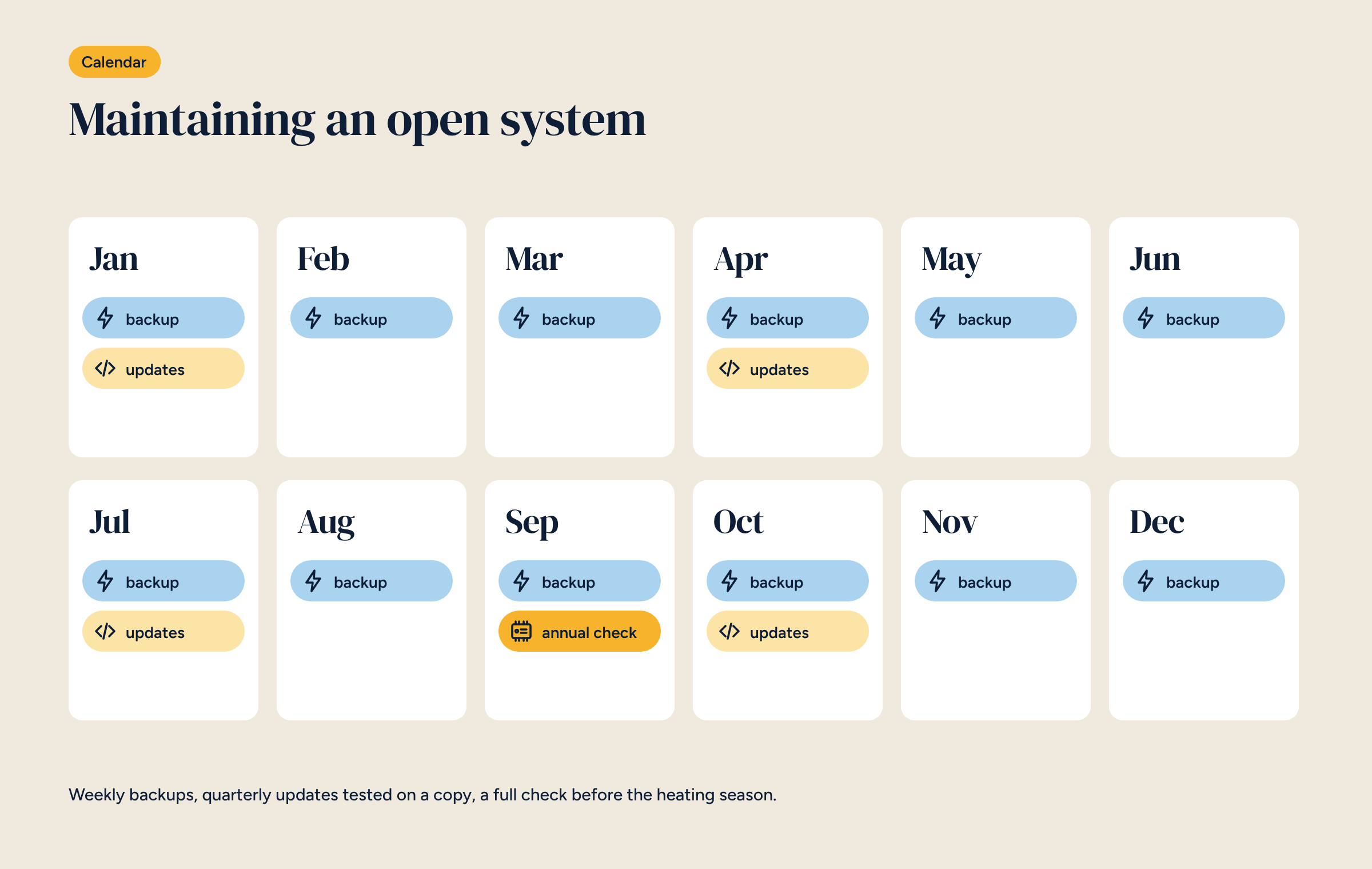
For a heating system we suggest this rhythm, adapted to the building:
The calendar in the illustration puts updates in January, April, July and October and the check in September. It can move, with one rule: no major updates in the coldest or hottest weeks of the year, when a problem costs most.
The golden rule is never to update a live system for the first time. Test on a copy first.
For an installer looking after many systems with the same configuration, one test covers them all: one of the advantages of ready-made configurations.
The backup is the safety net for every update. Before updating, make a manual backup on top of the automatic ones. If the update causes problems that can’t be fixed straight away, restore the backup and go back to where you were.
A backup has to be tested to be trusted. At least once a year, restore it onto a test controller to make sure it really contains everything and the procedure works. It is also the best preparation for a hardware failure, as we wrote in the minimum security rules.
Even with all the testing, something may stop working after an update: an integration that renamed an entity, a Node-RED node that behaves differently, a Zigbee device that no longer responds. Three rules limit the damage.
Every intervention adds a line to a log: date, who, what, versions before and after, outcome. It can be a simple document shared with the client. When the installer changes, or when you need to understand why a system behaves differently from a year ago, it is the first place to look.
Before the heating season, a full visit:
In an open system, roles must be written down, because anyone could step in.
The maintenance contract is agreed with the installer, as for the building’s other systems. There is no mandatory fee to ETECH LAB to keep the system running: a choice we explained in the article on Brick’s free software.
Many maintenance tasks can be done remotely: backups, chart reviews, some updates. They need secure access, with a VPN and a personal installer key, as described in the article on remote access to Home Assistant. Checks on physical components and the most delicate updates still happen on site.
A system lasts twenty years; a controller’s hardware perhaps less. With an open system, moving to new hardware is not a rebuild: restore the configuration onto a new controller and the system starts again. It is the difference between a system that ages with its manufacturer and one that is renewed by those who run it, the theme of the article on Home Assistant in a professional installation.
For Brick installers: news on configurations, recommended updates and guidance on what to check after each release.