Measured energy

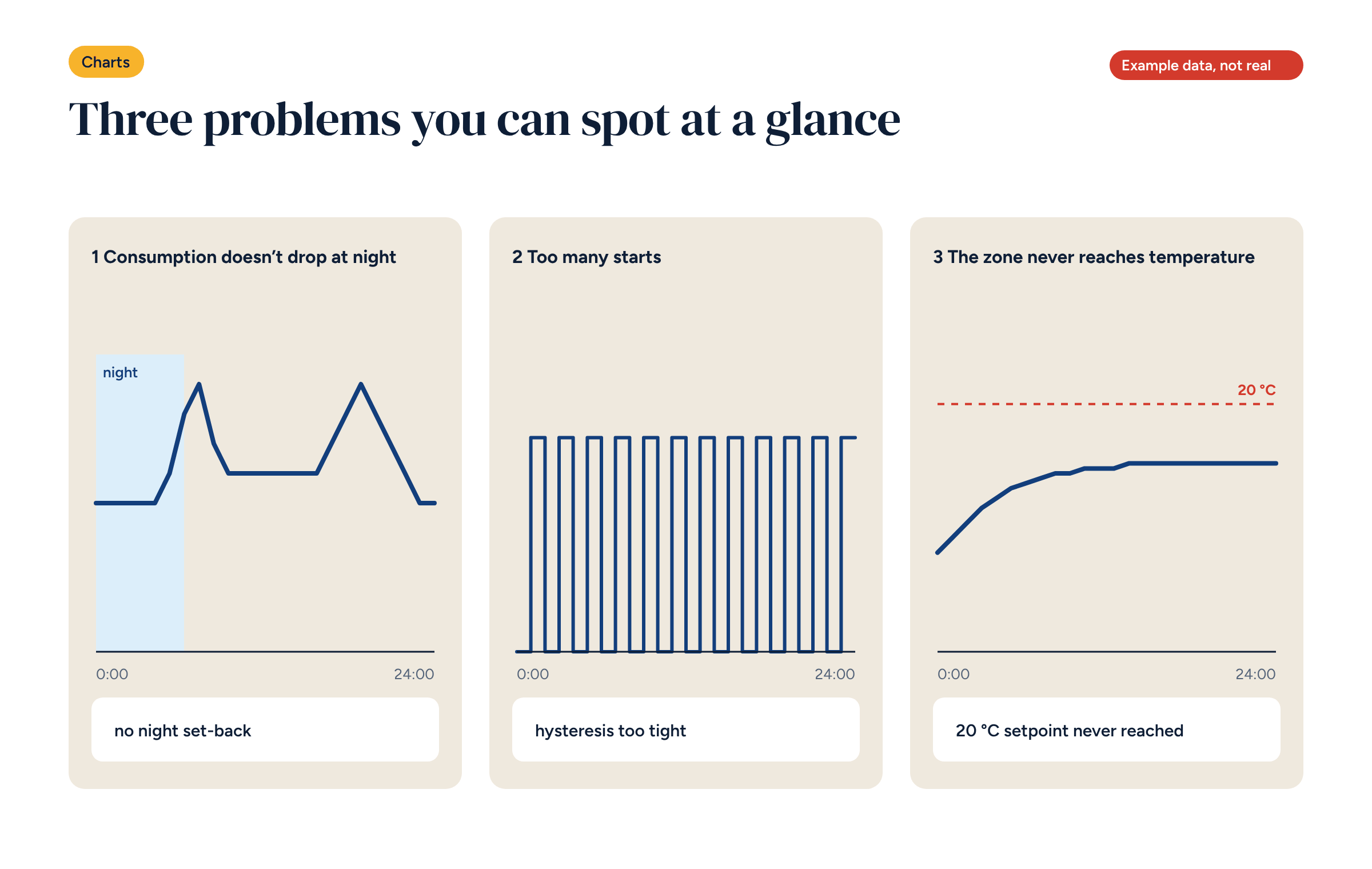
You don’t need to be an engineer to read your system’s charts. Three recurring shapes, recognisable at a glance, point to most of the problems that push consumption up. Here is what they are and what to do.
Many systems now log their data, and many owners have access to a Grafana energy dashboard or something similar. Few look at it after the first week. The reason is simple: a chart full of lines says nothing if you don’t know what to look for.
The good news is that you don’t need to read everything. Most of the problems that make a heating system use more than it should can be recognised from three recurring shapes. In this article we describe them one by one, with the most likely causes and what to do. They are meant for people who manage a building, not those who designed it.
To recognise the three problems you need three charts, which almost every monitoring system offers:
Look at them on a normal day, not during a party or with the windows open for cleaning. And keep the outdoor temperature alongside: high consumption on a night at zero degrees is not a problem.
What you see. On the hourly consumption chart, the night hours are as high as the day hours, or nearly. There is no “valley” you would expect while everyone sleeps and the system runs at set-back.
What it means. Night set-back is missing or not working. The system keeps daytime temperatures through the night.
The most common causes.
What to do. Check the schedules zone by zone, and find out which demands reach the heat source at night. With underfloor heating the set-back should be moderate, two or three degrees, but it should be there.
What you see. On the heat source status chart the line keeps going up and down: dozens of starts a day, each lasting a few minutes. The chart looks like a comb.
What it means. The heat source is short-cycling. Every start has a cost: it uses more energy at start-up, runs less efficiently and wears out sooner.
The most common causes.
What to do. Lower the heating curve, if there is one, as explained in the article on weather compensation. Widen the hysteresis and set a minimum run time. If the problem persists, the heat source is probably oversized: worth raising with the installer at the next service.
What you see. On one zone’s chart the temperature rises but levels off below the set point and stays there for hours. The other zones reach temperature.
What it means. That zone is calling for heat and not getting it, or not enough. Meanwhile the heat source works for it, often at a higher temperature than needed.
The most common causes.
What to do. Start with the simplest check: touch the manifold and feel whether that zone’s loop warms up when the zone is calling. Then check where the sensor is. If everything is in order, the problem is in the room, and the data helps decide what work is needed.
One last problem does not show in a day but over a month: consumption per degree day rising slowly, week after week. It means the system is getting less efficient: a dirty filter, a valve that no longer closes properly, a setting changed and forgotten. You only see it by comparing periods, as we described in the article on the six readings in a plant room.
Learning to spot problems also means learning not to see them where there are none. Some shapes look odd but are normal.
Before taking action, always ask whether there is a simple explanation.
Once everything is set up, a few minutes a week in the heating season are enough. A good rhythm is:
The three problems can also become automatic alerts: a zone calling for heat for more than three hours, too many starts in a day, night-time consumption above a threshold. In the Node-RED zone flow we showed how to build the first one, and in the Grafana plant room dashboard how to display the others.
Alerts do not replace a human eye, but they make sure the chart gets opened when it matters. That is where a system that uses too much becomes a system that uses the right amount.
If you have a Brick system, or any system that already logs consumption, send us an extract of the data: we will tell you what we see.