Measured energy

Home Assistant shows what is happening now. To understand how a plant room works over a week, a month or from one winter to the next, you need Grafana. Here is how to build a dashboard that is actually useful.
Anyone who commissions heating systems knows that a single reading says little. The flow is at 34 °C: is that right? It depends on the time of day, the outdoor temperature and how many zones are open. The answers only come from looking at data over time.
Home Assistant records its sensors’ history, but it is designed to show the current state and recent history. To analyse weeks and seasons, the tool to use is Grafana, the open-source charting tool also used in data centres and power grids. A Grafana and Home Assistant energy dashboard is what turns readings into answers, and in Brick the two come installed together.
A good dashboard starts from questions, not from the sensors available. For a plant room the questions are almost always these: does the heat source run when it should? Does it run at the right temperatures? How much does it use, and why more on one day than another?
A few readings are enough to answer them:
The right frequency is one reading a minute for temperatures, and a value on every change for states. Any denser is pointless; any sparser and you miss the heat source’s short cycles, which are exactly what you are looking for.
Home Assistant stores history in its own database, by default for ten days, plus hourly statistics that it keeps for longer. A plant room dashboard needs months and years of per-minute data. So the data also goes into a database built for time series, such as InfluxDB, which Home Assistant feeds through a ready-made integration.
Two precautions avoid trouble later on.
sensor.underfloor_flow, not sensor.temp_3. Rename something after a year and the charts lose its history.The dashboard we suggest has five panels, arranged to answer the questions in order.
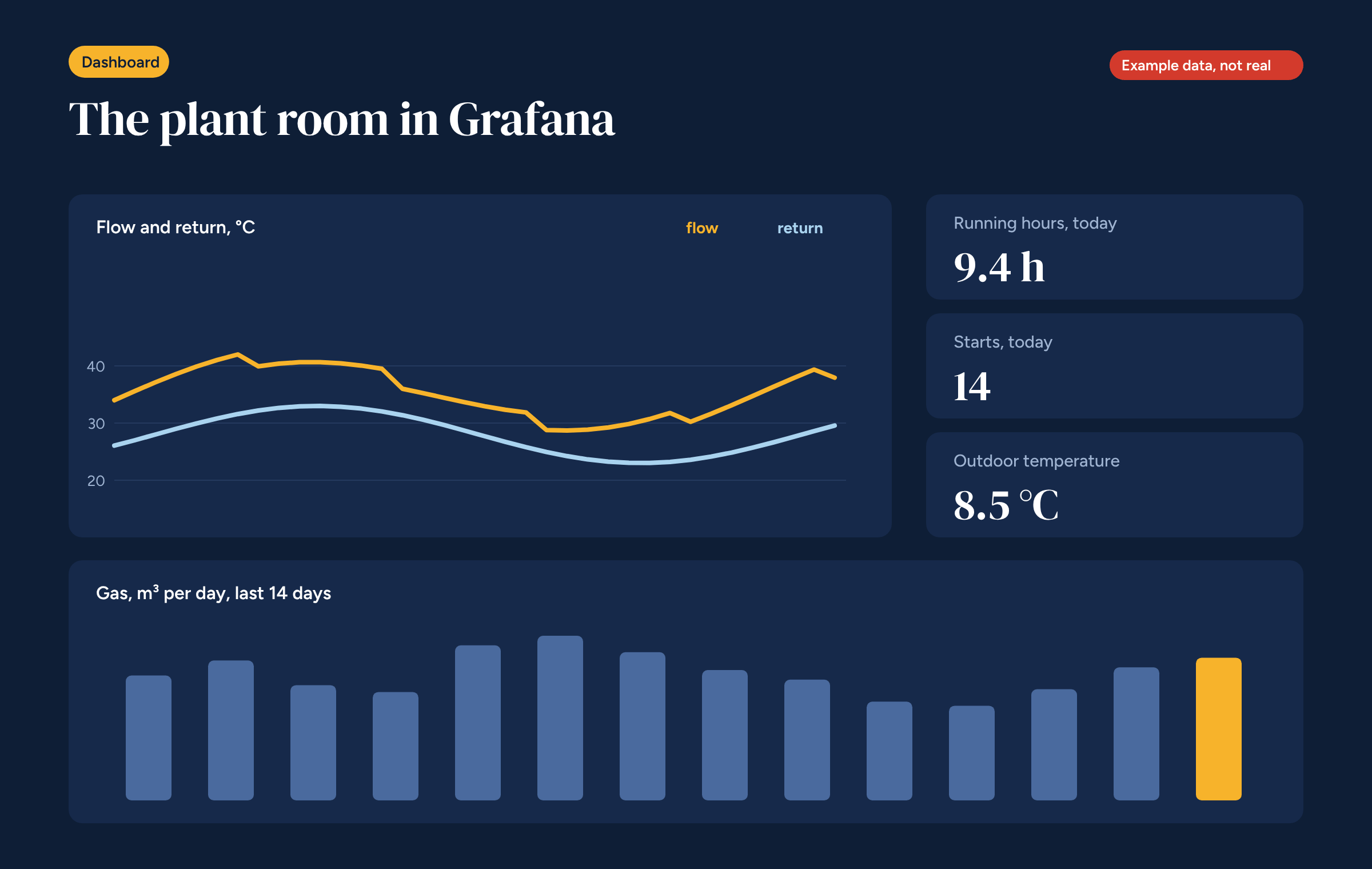
Flow and return. A line chart of the two temperatures over the last 24 hours or the last week. The gap between the lines, the temperature difference, shows how much heat the system is delivering. A very small difference while the heat source is on points to excessive flow or a system that is not taking up heat.
Running hours and starts. Two numbers for today, compared with previous days. Many short starts are the clearest sign of an oversized heat source or a hysteresis set too tight.
Outdoor temperature. A number, and a thin line under the other charts. Without it, no consumption figure can be judged.
Daily consumption. A bar chart of the last 14 or 30 days. Next to it, consumption divided by degree days, which makes a mild day comparable with a cold one.
Zones. A grid with one row per zone and each hour coloured by temperature. At a glance you can see which room struggles and which overheats.
Grafana can also send alerts. In a plant room only a few alerts are useful, and it pays to keep them few, otherwise people stop reading them.
The most urgent alerts, such as a heat source that won’t start, are best also handled in Node-RED, close to the control logic. Grafana remains the tool for alerts that need data viewed over time.
A dashboard is only useful if someone looks at it. Our advice is to look at it at two moments.
The second check is what turns the dashboard into a management tool: if consumption per degree day rises for no reason, something in the system has changed and needs finding.
Almost every system, shown on a dashboard for the first time, reveals something nobody knew. Three discoveries come up more than any others.
The heat source runs at night for no reason. Night set-back is configured on the zones, but the heat demand stays active because of hot water recirculation or a zone left on Comfort.
The boiler starts dozens of times a day. That is the sign of a boiler oversized for the building, or of a heating curve set so high that it reaches temperature in minutes. Lowering the curve lengthens the cycles and reduces wear.
One zone is always calling. A room that never reaches its set point may have a faulty actuator, a loop closed at the manifold, a badly placed sensor or simply a cold wall. The dashboard does not tell you which of the four, but it tells you where to look.
These discoveries are worth far more than the time spent building the dashboard.
The dashboard from this article can be downloaded as a JSON file and imported into Grafana from the dashboards menu. After importing, connect the data source and adapt the measurement names to your system. The panels use the palette from our articles: sun for warm, sky for cool, blue for the rest.
If the Node-RED zone flow described in the dedicated article writes its data to the same database, the zones row fills itself. And if you want to measure the savings from zone control, as we explained when looking at what the research says, this dashboard is the place to start.
The dashboard described in this article, as a JSON file to import into Grafana. Connect your data sources and adapt the measurement names.