Open by choice

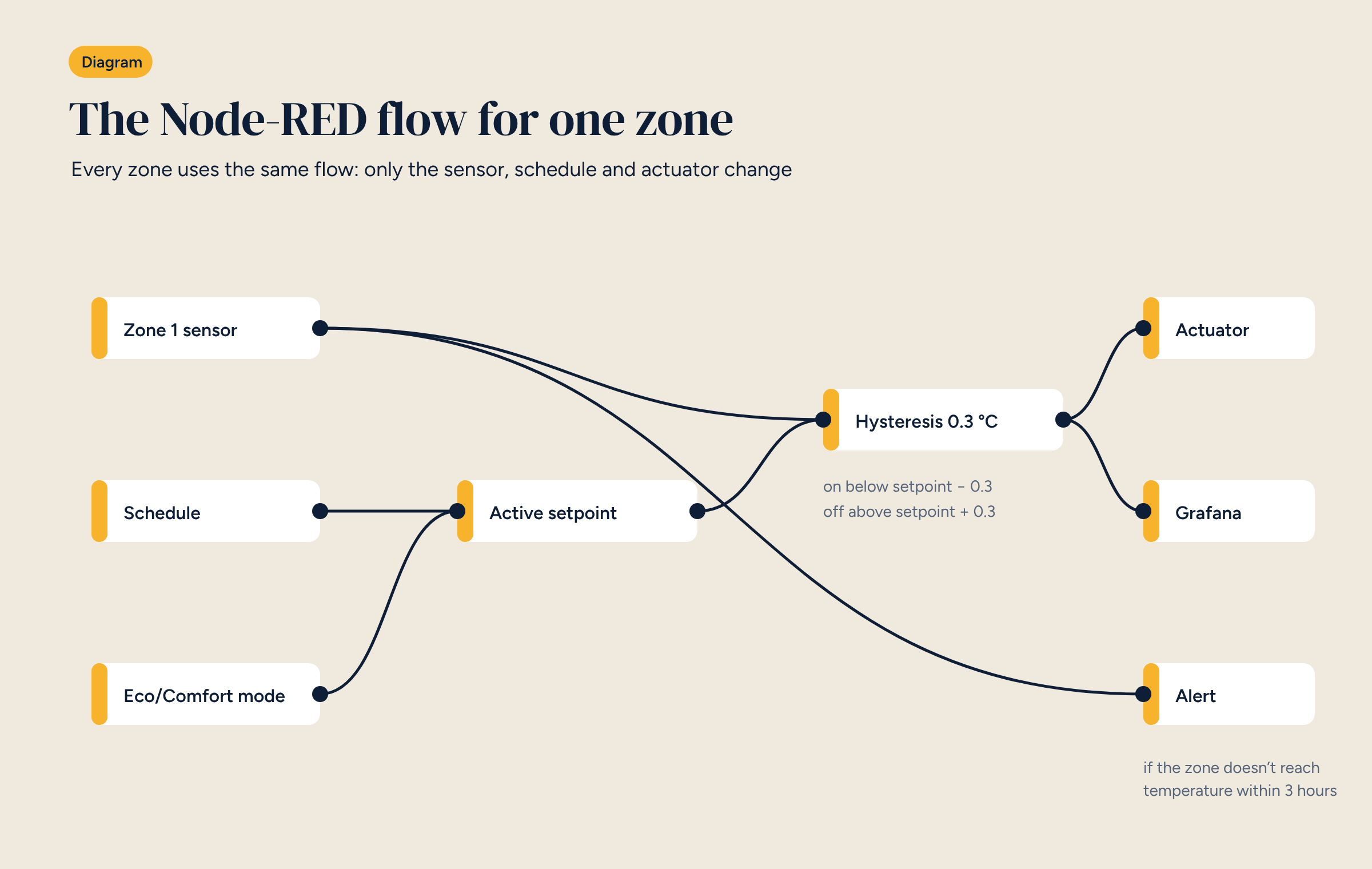
Home Assistant shows the rooms and collects the data. The logic that decides when to open a zone is better kept in Node-RED, where you can see it, test it and copy it from one zone to the next. Here is a complete flow, node by node.
In a Brick system, two open-source tools work together. Home Assistant is the interface: it shows the rooms, collects device data and provides the app. Node-RED is where the logic lives: it decides when a zone should heat, how it coordinates with the others and what to do if something goes wrong.
Using Node-RED for heating control alongside Home Assistant is not compulsory, since Home Assistant has its own automations. For heating control, though, it pays off, and in this article we look at why and how, by building the flow for one zone.
Node-RED is a visual programming environment that started at IBM and is now run by the OpenJS Foundation. You build logic by wiring nodes together: one node reads a value, another processes it, another sends a command.
For anyone controlling heating systems it has three advantages over automations written in Home Assistant.
Anyone with a background in professional building management will find a familiar way of working: function blocks wired together.
A zone’s flow has three inputs, a core and three outputs.
Inputs.
sensor.bedroom_temperature. Every new reading enters the flow.Core.
Outputs.
You can build hysteresis from ready-made nodes, but a function node of a few lines is clearer:
// Input: msg.payload = zone temperature in °C
const sp = flow.get("setpoint_zone1") ?? 20;
const hyst = 0.3;
let state = context.get("state") ?? false;
const t = Number(msg.payload);
if (isNaN(t)) return null;            // invalid reading: change nothing
if (t <= sp - hyst) state = true;     // below threshold: heat
else if (t >= sp + hyst) state = false; // above threshold: stop
context.set("state", state);
msg.payload = state;
return msg;
Two details matter. An invalid reading, for example when a wireless sensor’s battery is flat, must not change the state. And the hysteresis value has to suit the system: 0.3 °C is fine for slow underfloor heating; a faster fan coil may need different values and minimum on-times.
The schedule is the part the client sees and changes most often. So the values are best kept in Home Assistant, as entities editable from the app, with Node-RED reading them. The client moves the wake-up time in the app and the flow follows, without anyone opening Node-RED.
A practical tip for underfloor heating: instead of switching the zone on at the comfort time, bring it forward by an amount that depends on the outdoor temperature and on how far the zone is from its set point. You can start with a fixed lead time, say two hours, and refine it by looking at the charts from the first few weeks.
The zone flow is the building block. The system is built on top of it, with a flow that looks at all the zones together:
This is where Node-RED shows its strength: each level is a separate flow, readable and testable on its own. As we wrote about Home Assistant in a professional installation, the difference from DIY is not the software but the way it is used: documented, tested, repeatable.
People starting out with Node-RED for heating control tend to trip over the same things.
Before connecting the flow to real actuators, test it with values injected by hand: temperatures below and above the threshold, invalid readings, mode changes. And export the flow and keep it with the system diagram. The flow is part of the documentation, just like the wiring diagram.
The flow described in this article, ready to import into Node-RED. Rename the entities to match your system and test it on one zone first.