From panel to data

A well-made wiring diagram reads like a book: every sheet has a job, every wire a number, every component a tag. Here is how a heating control panel diagram is organised, and how to use the ones that come with Brick’s configurations.
The heating control panel wiring diagram is the document that stays with a system longer than anyone who installed it. The maintenance engineer opens it ten years later, the electrician who has to add a zone, the technician hunting for a fault in mid-winter. If it is clear, the job takes minutes. If it isn’t, or it doesn’t match the real panel, it takes hours.
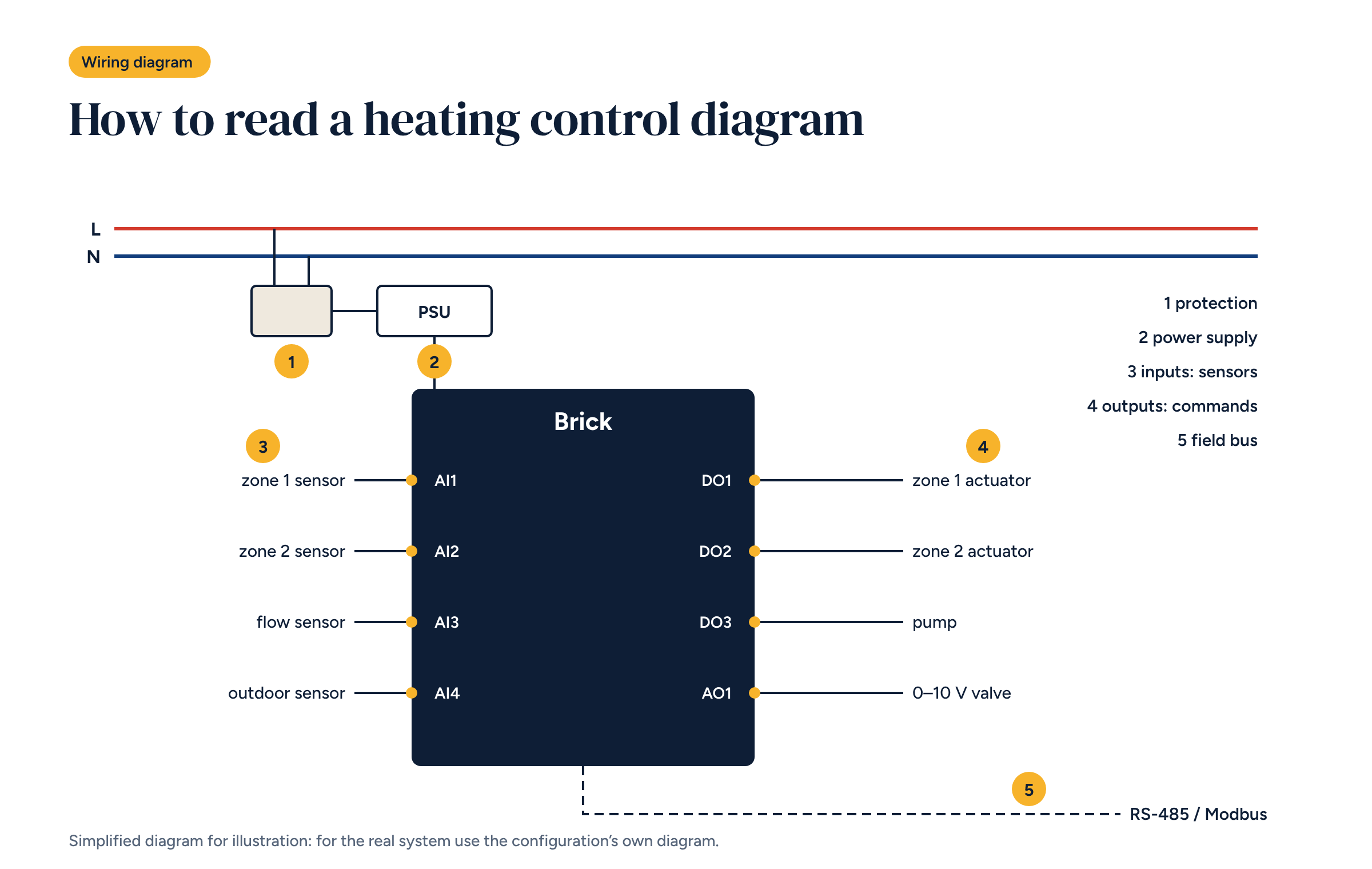
In this article we read a heating control diagram together, sheet by sheet. The illustration is simplified and its numbers match the sections below: a real diagram has more sheets and more detail, but the logic is the same.
A panel diagram is not a single drawing. It is a set of sheets, each with a job:
Each sheet has a title block with its number and numbered columns, so any component can be located precisely: sheet 4, column 6.
Symbols follow international standards: a breaker, a relay, a motor and a sensor always look the same. Tags identify each component, usually with a letter for the type and a sequential number. You will often see Q for protective devices, K for relays, X for terminal strips, B for sensors and M for motors such as pumps and fans.
The golden rule is that the tag on the diagram matches the label in the panel. It sounds obvious, but it is the first thing lost when a panel is modified on site.
The first sheet starts from the incoming supply, line and neutral, and distributes it to the loads through protective devices. In a heating control panel it pays to have separate protection at least for:
That way a faulty actuator does not shut down the controller, and a short circuit on a pump does not black out the whole plant room. On the diagram each device shows its rating and trip curve.
The controller and many control devices run at extra-low voltage. The power supply derives it from the mains and distributes it. The diagram shows its rating, which must cover every connected load with a margin, and the polarity of its outputs.
If the actuators are 24 V, the power supply or transformer feeding them must be sized for the inrush current at switch-on, much higher than the running current, as we saw in the guide to underfloor heating control.
The inputs sheet shows what goes into the controller: each zone’s temperature sensor, the flow sensor, the outdoor sensor, the heat source status contacts and any pulse meters. Each input has its number on the controller, for example AI1 for the first analogue input, and its terminal on the strip.
For sensors the diagram also states the type, because different sensors are not interchangeable: a sensor with a different sensing element from the one expected reads wrong temperatures without raising any obvious error.
The outputs sheet shows what the controller drives: each zone’s actuators, the pump, the heat demand and the mixing valve. Digital outputs, marked for example DO, switch on and off; analogue outputs, such as AO, give a continuous signal, usually 0–10 V.
When a load is larger than the controller’s output can switch directly, the diagram shows an interface relay: the output drives the relay, and the relay drives the load. For the mixing valve, the diagram shows supply, control signal and position feedback, as described in the article on three-way valves.
The final section connects devices that speak a protocol: Modbus room controllers, heat pumps, meters. On the diagram the bus is drawn as a line running from one device to the next, with each address and the termination resistors at both ends.
It is the sheet you consult most when something won’t communicate: addresses, baud rate, conductor polarity.
The terminal strip sheet is the one people working on the panel actually use. For each terminal it gives the number, the internal connection and the external cable with its destination: “X2.14, zone 3 sensor, cable to the living room”. Strips are grouped by type, supplies, inputs, outputs, buses, in the same order as in the panel.
With a good terminal sheet you can wire a system without looking at the rest of the diagram, and trace a fault starting from the room rather than from the controller.
The bill of materials lists every component with its tag, description, manufacturer and part number. It is used to order materials and, years later, to replace a part with an identical one.
Then comes the last step, the most neglected: updating the diagram with the changes made on site, the as-built version. A diagram that does not match the panel is worse than none, because it misleads. The updated copy should be left in the panel and handed to the client.
For Brick configurations, architecture diagrams and, where provided, wiring diagrams are available in DWG format. They open in any CAD package and are meant as a starting point: adapt them to the number of zones, the chosen components and the protection the system requires.
If you start from configuration A0 or B2, the inputs, outputs and heat source connections are already drawn. What remains is the job no standard diagram can do: checking it against the real system and updating it at the end. For mounting the panel, the rules described in the article on Brick on a DIN rail apply.
Every Brick configuration has an architecture diagram and, where provided, a wiring diagram in DWG. Open them in your CAD software and adapt them to the system.