Open by choice

Home Assistant runs on almost anything, but a heating system needs a controller that sits in the panel like every other component: fixed, powered, protected, with terminals instead of loose wires. Here is what that takes, and how we solved it in Brick.
Anyone who has tried running Home Assistant on a DIN rail, inside the real electrical panel of a heating system, knows the problem well. The software is ready for the job; the hardware usually isn’t. A board designed for a desk has to be adapted with brackets, power supplies, add-on boards and cables, and the result is a panel only its builder can read.
A Home Assistant DIN rail controller designed for building services is what Brick sets out to be. In this article we look at what a heating control panel asks of a controller, and how we turned that into hardware.
A heating control panel is not a cupboard to put devices in. It is a set of components mounted, protected and connected to precise rules, which must work for many years in a plant room that is often hot, dusty and electrically noisy. It asks five things of a controller.
Mounting. Everything clips onto the DIN rail, the standard metal rail in electrical panels. A component that doesn’t fit the rail needs brackets and adaptations, and cannot be swapped quickly.
Power. From the panel, with its protection devices, not from a plug-in adapter. Preferably extra-low voltage, separated from the mains, like the other control devices.
Inputs and outputs. A plant room has temperature sensors, status contacts, meters, actuators, pumps and modulating valves. Each needs a suitable input or output, not board pins adapted with add-on modules.
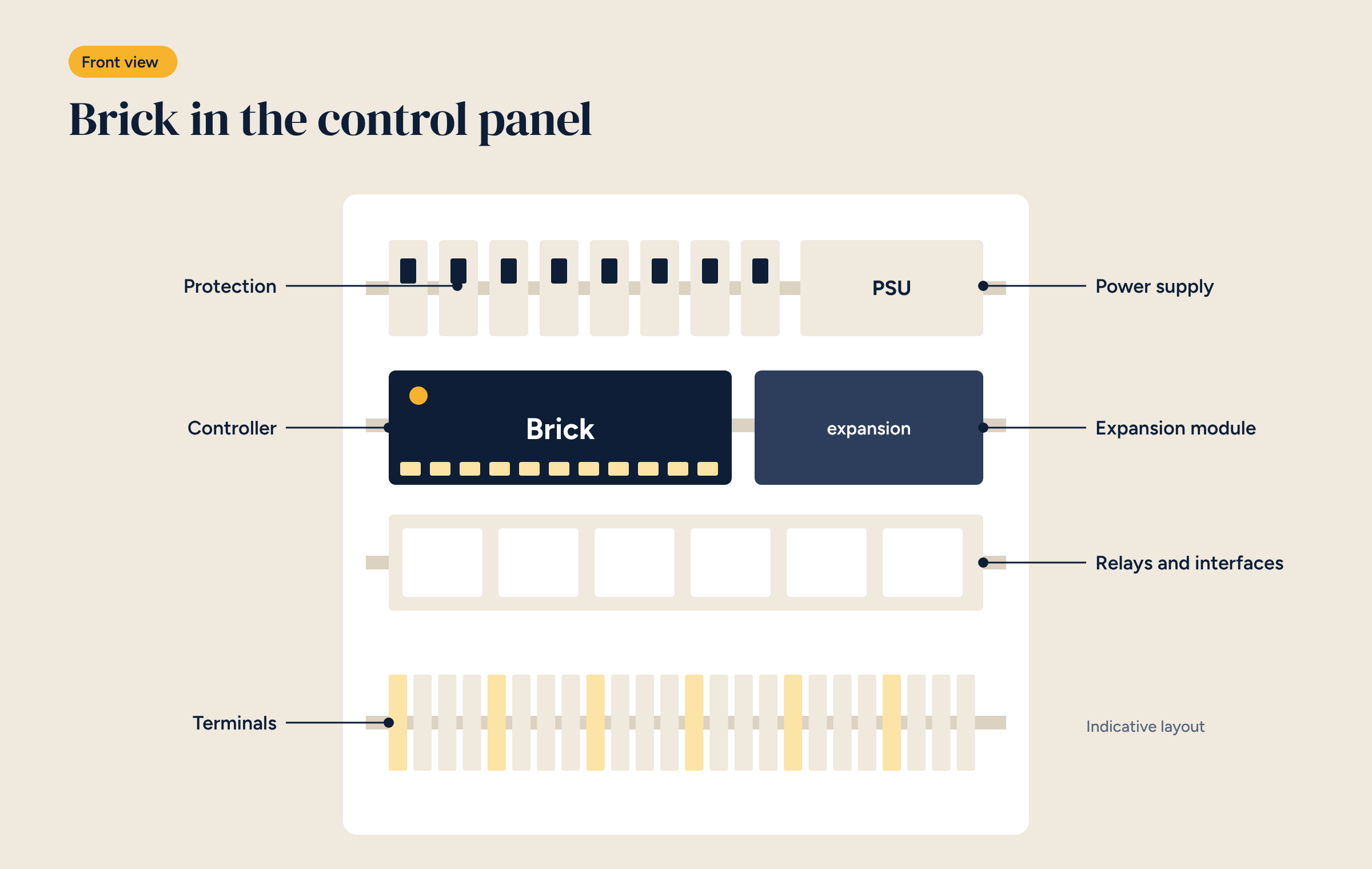
Terminals. Every wire lands on a numbered terminal, as in the diagram. Whoever opens the panel five years later must be able to follow a cable without guessing, and replace a component without redrawing the diagram.
Robustness. Operating temperatures suited to a plant room, storage that survives years of continuous logging, and automatic restart after a power cut.
Brick is designed around these requirements.
On top of the hardware come the ready-made configurations for underfloor and fan coil systems, with wiring diagrams showing where every wire goes.
A panel with Brick is laid out like any heating control panel, over several DIN rails.
Spare space matters too: leaving at least a fifth of each rail free lets you add a module or a breaker later without rebuilding the panel. Two wiring rules matter more than the rest. Sensor and bus cables, such as RS-485 for Modbus, run separately from power cables to avoid interference. And the Zigbee coordinator’s antenna, if used, must be brought outside the metal panel, which would otherwise screen the signal.
In many systems, especially in non-residential buildings, people need to see the system’s status without a phone: the maintenance engineer entering the plant room, a school caretaker, hotel staff. Brick-HMI meets that need. It shows zones, temperatures and alarms, and allows the essential commands, right there.
A panel display also helps with security: service functions can be kept on the display only, not in the app, so people off site can see everything but cannot change critical parameters.
There are, of course, other ways to bring Home Assistant into a panel, and it is worth knowing them. Several manufacturers, including Italian and other European ones, offer industrial DIN rail boards based on Raspberry Pi, with protected inputs and outputs: excellent components, aimed mainly at integrators and developers building their own systems. Then there are home-made solutions, with a board in a box and add-on modules.
Brick’s difference lies less in the hardware than in what sits on top of it: configurations already proven for heating control, wiring diagrams already drawn, and the experience of people who have been commissioning heating systems for twenty years. If you want to build everything yourself, start from Brick Raw, the bare hardware; if you want a system that works from day one, start from a configuration.
A controller in a panel has to cope with the normal events of a building system: a power cut, interference, an update. Three precautions help.
These are the principles we described in Home Assistant in a professional installation, translated into the panel.
Brick is installed like any other component of a heating control panel, with the same tools and the same rules: an electrician or heating engineer experienced with panels does not need IT skills to mount and wire it. The software configuration is done with Home Assistant and Node-RED tools, or arrives ready-made. For the overall layout of the panel and plant room, see our guide to underfloor heating control.
Inputs, outputs, power supply and dimensions of the controller, the expansion module and the Brick-HMI panel.